Conti
An Exchange server was compromised with ransomware. Use Splunk to investigate how the attackers compromised the server.
Task 1: SITREP
Some employees from your company reported that they can’t log into Outlook. The Exchange system admin also reported that he can’t log in to the Exchange Admin Center. After initial triage, they discovered some weird readme files settled on the Exchange server.
Below is a copy of the ransomware note.
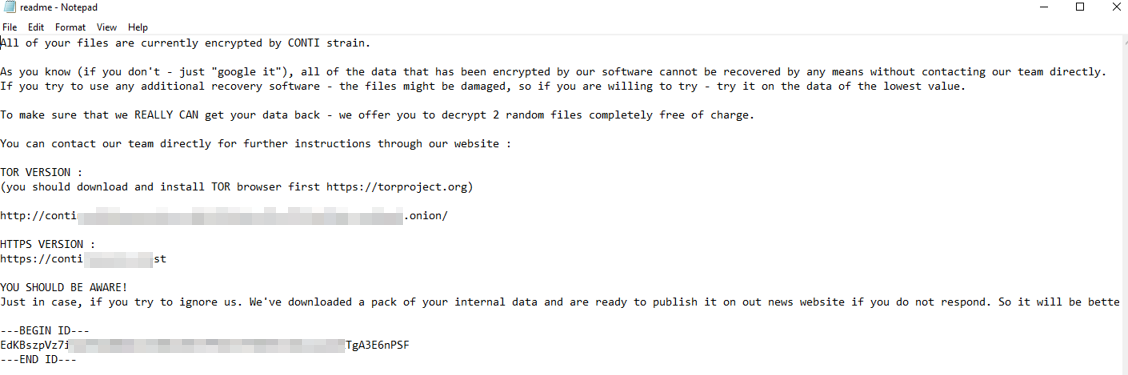
Warning: Do NOT attempt to visit and/or interact with any URLs displayed in the ransom note.
Read the latest on the Conti ransomware here.
Connect to OpenVPN or use the AttackBox to access the attached Splunk instance.
Splunk Interface Credentials:
Username: bellybear
Password: password!!!
Splunk URL: http://MACHINE_IP:8000
Special thanks to Bohan Zhang for this challenge.
Task 2: Exchange Server Compromised
Below are the error messages that the Exchange admin and employees see when they try to access anything related to Exchange or Outlook.
Exchange Control Panel:

Outlook Web Access:
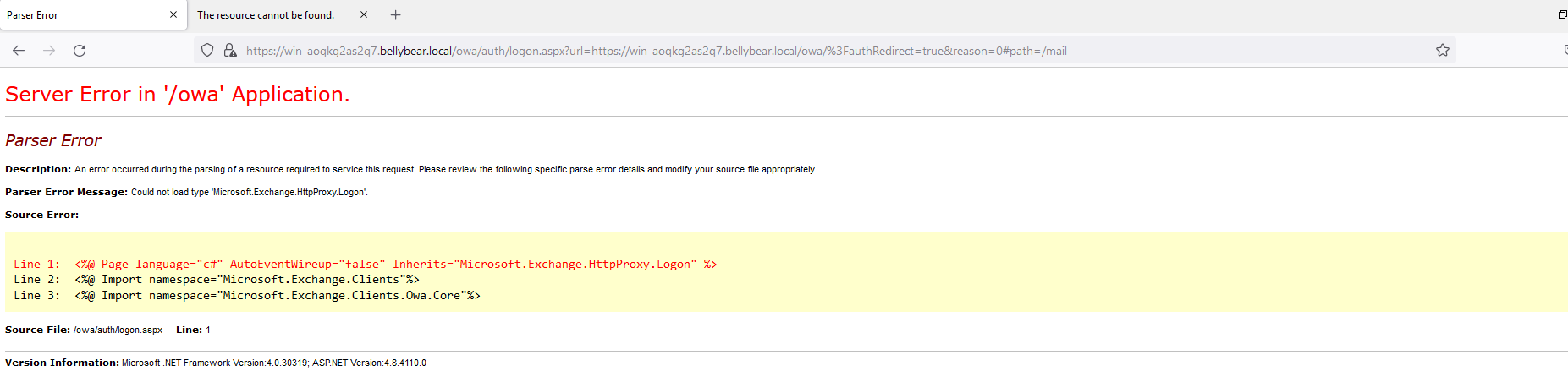
Task: You are assigned to investigate this situation. Use Splunk to answer the questions below regarding the Conti ransomware.
Answer the questions below
Can you identify the location of the ransomware?
index="main" source="WinEventLog:Microsoft-Windows-Sysmon/Operational" EventCode=11
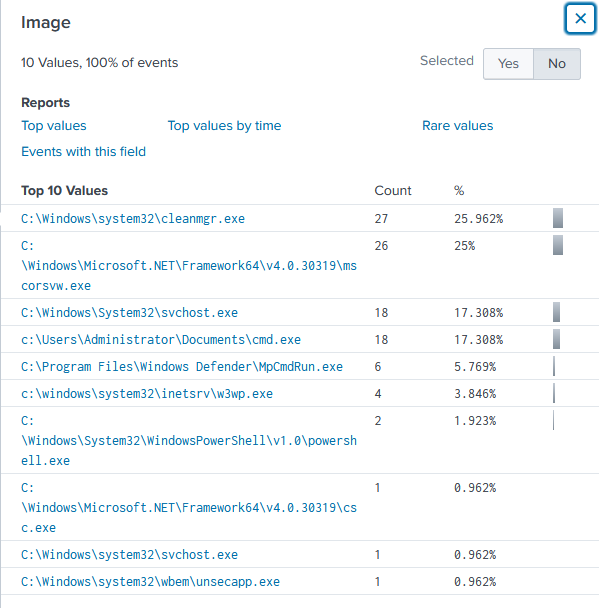
Answer: C:\Users\Administrator\Documents\cmd.exe
What is the Sysmon event ID for the related file creation event?
https://learn.microsoft.com/en-us/sysinternals/downloads/sysmon

Answer: 11
Can you find the MD5 hash of the ransomware?
index="main" source="WinEventLog:Microsoft-Windows-Sysmon/Operational" Image="C:\\Users\\Administrator\\Documents\\cmd.exe" Hashes="*"
Answer: 290c7dfb01e50cea9e19da81a781af2c
What file was saved to multiple folder locations?
index="main" source="WinEventLog:Microsoft-Windows-Sysmon/Operational" EventCode=11 RuleName=Downloads
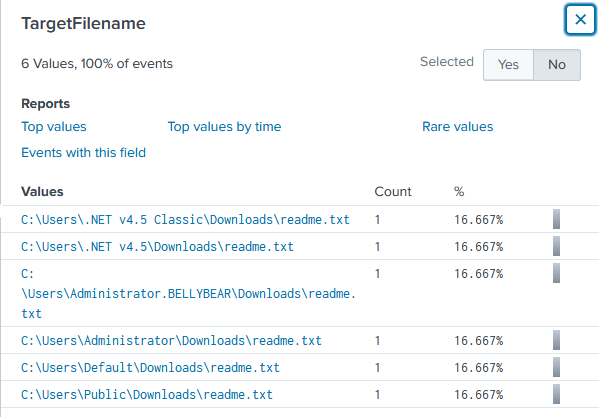
Answer: readme.txt
What was the command the attacker used to add a new user to the compromised system?
I decided to filter the parentcommandline to see
index="main" source="WinEventLog:Microsoft-Windows-Sysmon/Operational"| rare limit=20 ParentCommandLine
Answer: net user /add securityninja hardToHack123$
The attacker migrated the process for better persistence. What is the migrated process image (executable), and what is the original process image (executable) when the attacker got on the system?
index="main" source="WinEventLog:Microsoft-Windows-Sysmon/Operational"
Hint said to look at Event Code 8, there are only 2 entries here which I assumed when the attacker started and migrated.
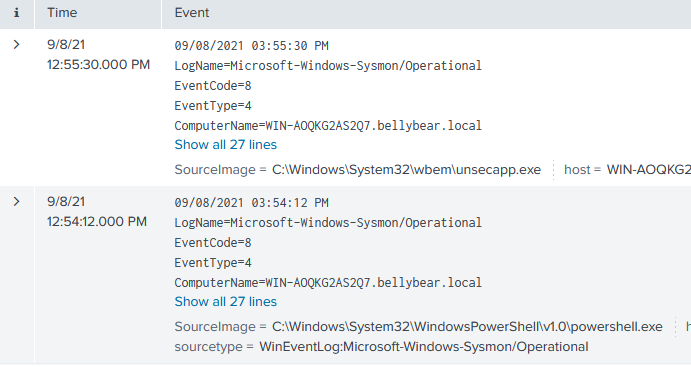
Adding SourceImage in the selecting field shows us the answers.
Answer: C:\Windows\System32\WindowsPowerShell\v1.0\powershell.exe, C:\Windows\System32\wbem\unsecapp.exe
The attacker also retrieved the system hashes. What is the process image used for getting the system hashes?
There are 2 values in the TargetImages field, lsass.exe and unsecapp.exe.
lsass.exe is a windows process is used in security related tasks such as verifying user access, password changes, and creates access tokens. This is also often targeted by attackers because of the sensitive information it holds. Extra Sauce
On the other hand, unsecapp.exe is used to execute WMI scipts.
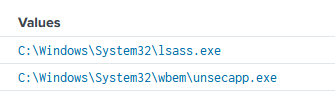
Answer: C:\Windows\System32\lsass.exe
What is the web shell the exploit deployed to the system?
Move from sysmon logs to iis and searched for unfamiliar post requests in the cs_uri_stem.
index="main" sourcetype=iis cs_method=POST
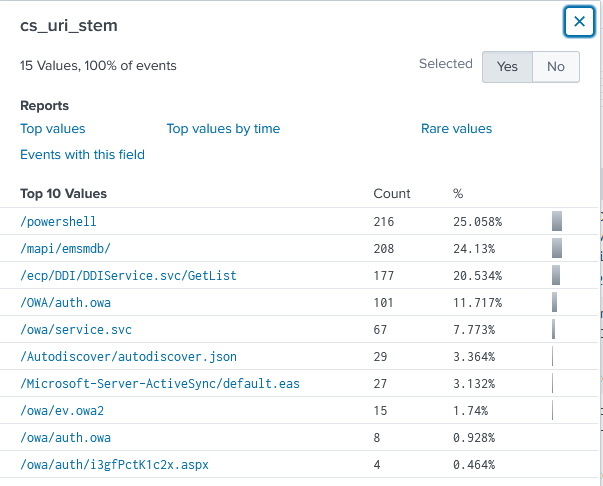
Webshell deployed in IIS are in aspx
Answer: /owa/auth/i3gfPctK1c2x.aspx
What is the command line that executed this web shell?
Moved back to sysmon logs and filtered the .aspx extension.
Answer:
[attrib.exe -r \\\\win-aoqkg2as2q7.bellybear.local\C$\Program Files\Microsoft\Exchange Server\V15\FrontEnd\HttpProxy\owa\auth\i3gfPctK1c2x.aspx](http://10.10.175.111:8000/en-US/app/search/search?earliest=0&latest=&q=search%20index%3D%22main%22%20source%3D%22WinEventLog%3AMicrosoft-Windows-Sysmon%2FOperational%22%20.aspx&display.page.search.mode=smart&dispatch.sample_ratio=1&workload_pool=&display.events.fields=%5B%22host%22%2C%22source%22%2C%22sourcetype%22%2C%22cs_uri_stem%22%5D&display.prefs.fieldFilter=&display.general.type=events&display.visualizations.charting.chart=line&display.page.search.tab=events&sid=1714487382.104#)
What three CVEs did this exploit leverage?
Answer: CVE-2020-0796, CVE-2018-13374, CVE-2018-13379